If your team relies on remote interpreters, you have likely heard this operational challenge:
"It takes too many steps to get an interpreter connected during a busy encounter."
When operations teams investigate connection delays, the root cause is rarely interpreter availability. In most cases, the friction stems from process design.
When language access operates as a standalone application, staff must pause their current task, leave their primary software, open a separate portal or dial a hotline, manually enter information that already exists in their database, and type up session notes afterward.
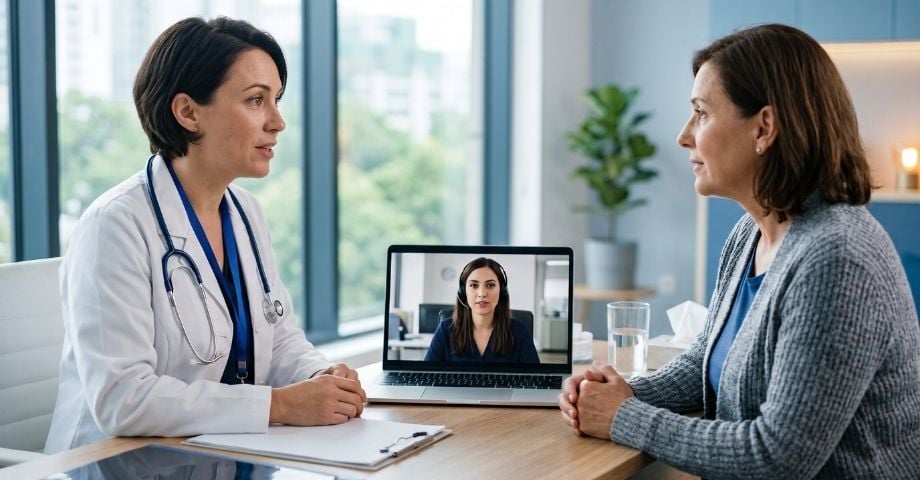
Modern language access is not about adding another software application to your team's workstations. It is about connecting language services directly into everyday tools so staff can focus on the person in front of them while record-keeping occurs automatically in the background.
Quick Summary for Operations & IT Leaders
Integrating Video Remote Interpreting (VRI) and Over-the-Phone Interpretation (OPI) into existing software—such as Electronic Health Records (EHRs), telehealth systems, or municipal service portals—allows staff to request qualified interpreters directly within their active workflow. By leveraging REST APIs, webhooks, or SMART on FHIR protocols, integrated systems automatically pass language preferences to the interpreter and return session metadata (duration, interpreter ID, language pair) back to the primary record without requiring screen switching or manual data re-entry.
3 Practical Reasons to Connect Your Language Workflows
When remote interpretation operates as a standalone tool outside your primary software, it creates three ongoing operational challenges:
- Duplicated Administrative Effort: Asking staff to enter patient or client information into two separate applications wastes time and introduces data-entry errors. Across thousands of annual encounters, these lost minutes accumulate into significant administrative expense.
- Incomplete Record-Keeping: When logging an interpretation encounter requires manual entry after a call, busy employees may delay or skip documentation. This creates audit gaps in internal records and complicates compliance reporting. Reviewing the updated compliance requirements under Section 1557 of the Affordable Care Act (ACA) highlights why consistent record-keeping is vital for healthcare organizations.
- Fragmented Spend Visibility: When individual departments adopt ad-hoc interpretation tools, finance and procurement leads lose centralized oversight of service volume, modality mix, and total spend.
The Language Access Maturity Model
Evaluating your organization's technical readiness helps clarify where operational friction exists and what steps are needed to streamline access:
|
Maturity Stage |
What Staff Do |
What the Organization Sees |
|
Stage 1: Disconnected |
Staff use separate mobile apps, phone numbers, or ad-hoc tools. |
Limited visibility into overall usage and spend across departments. |
|
Stage 2: Centralized Access |
Staff access a single, approved interpretation portal or tablet. |
Improved vendor management, but manual steps remain for frontline staff. |
|
Stage 3: Integrated Request |
Staff request VRI or OPI directly from within their active software. |
Reduced setup time and zero screen switching during encounters. |
|
Stage 4: Connected Records |
Session duration and telemetry automatically flow back into the record. |
Complete audit history and automated departmental reporting. |
Organizations reviewing remote options for telehealth can explore our practical guide on telehealth interpretation compliance to evaluate hybrid care considerations.
Where AI Helps—and Where Qualified Humans Remain Essential
With automated translation features emerging in virtual platforms like Microsoft Teams and Zoom, enterprise leaders frequently ask how much automation makes sense.
Rather than viewing AI as either an all-in-one replacement or an option to avoid entirely, organizations achieve the best results by applying a risk-managed approach:
- • Internal team messaging
- • Draft staff notes
- • Live informal captions
- • Clinical care & IEPs
- • Formal public hearings
- • Certified ASL & Legal
- Low-Risk Internal Communications: Machine translation and automated captions work well for draft internal notes, team chats, or routine administrative messaging where minor errors do not impact health or legal standing.
- High-Stakes, Direct-Service Encounters: For diagnostic medical appointments, legal proceedings, and public hearings, relying solely on automated translation introduces severe accuracy risks. Federal standards under ADA.gov Effective Communication Standards and official U.S. Department of Health & Human Services (HHS) Civil Rights Guidance mandate qualified human interpreters. Reviewing the key differences between ASL interpreting services and AI captions illustrates why qualified human oversight remains necessary in specialized environments.
System Resilience: Automated Fallback Protocols
Technology integrations must function reliably in real-world conditions. Hospital Wi-Fi networks encounter dead zones, cellular signals fluctuate, and demand surges can temporarily impact video response times.
An enterprise-grade language workflow incorporates Automated Fallback Logic:
- Network Quality Monitoring: If video connectivity drops below acceptable thresholds during a Video Remote Interpreting session, the platform flags the connection issue.
- Seamless Audio Transition: The platform transitions the call to a high-definition Over-the-Phone Interpretation (OPI) line without dropping the interaction or requiring staff to re-dial.
- Dispatch Escalation: If remote connectivity cannot be maintained, an automated notification alerts regional coordinators to dispatch an on-site certified interpreter for critical care units.
5 Questions to Ask Before Changing Your Workflow
Before selecting an integration path or updating your interpretation setup, review these practical questions with your team:
Language Access Integration Readiness Checklist
Select the statements that apply to your current operational workflow:
Technical Summary for IT & Security Teams
If your IT or Security leads require technical validation before approving Language Network, share this summary:
- Interoperability Standards: Connects via REST APIs, webhooks, and SMART on FHIR protocols into Epic, Oracle Health (Cerner), athenahealth, Zoom, and custom portals. Technical frameworks can be reviewed on the HL7 SMART App Launch Framework.
- Data Security: Fully HIPAA compliant, SOC 2 Type II aligned, TLS 1.3 encrypted in transit, AES-256 encrypted at rest, executed BAAs, and zero persistent storage of video or audio streams. Explore our guide on HIPAA compliance and translation services for additional security protocols.
- Centralized Governance: Supports bi-directional telemetry to log session duration, interpreter ID, and language pair directly into the master record. Discover how enterprise language logistics provides unified reporting across departments.
Exploring a Connected Language Workflow
If your frontline teams are still switching between separate applications to request and document remote interpretation, evaluating your workflow can reveal immediate efficiency gains.
At Language Network, we partner with healthcare systems, public sector agencies, and enterprises to connect certified VRI, OPI, and ASL interpreters directly into everyday operational tools.
Speak with an Expert: Schedule a 15-Minute Workflow Review with our operations team to explore what a connected language setup would look like in your environment.
Frequently Asked Questions
In practical terms, it means placing the option to request an interpreter directly inside the primary software your team already uses—such as an EHR, a telehealth portal, or a CRM. Depending on configuration, it automatically passes language preferences and returns session details (duration, interpreter ID) to the primary record without manual typing.
AI tools can support low-risk internal communication or draft captions, but they are not designed for high-stakes medical, legal, or public interactions where accuracy and compliance are required. Federal regulations under Section 1557 and ADA Title II require qualified human interpreters for direct service delivery.
Properly configured integrations use encrypted connections (TLS 1.3) and operate under executed Business Associate Agreements (BAAs). Language Network processes real-time audio and video streams with zero persistent media storage, ensuring no PHI or PII remains on intermediate servers.
Enterprise integrations include automated fallback logic. If video quality drops below usable standards, the system transitions the active call to an audio-only (OPI) connection without dropping the session or requiring staff to re-dial.
About the Author
Elia Noroña is Senior Global Marketing Manager at Language Network, focusing on B2B marketing, enterprise language services, and market expansion across healthcare, education, government, and other regulated sectors. She works with operations and procurement leaders to simplify language access programs, maintain regulatory compliance, and build efficient supplier structures.
.